
A great gaming mouse can be the difference between clutching that final round and missing your shot by pixels. Whether you are grinding ranked matches in Valorant, executing pixel-perfect combos in fighting games, or commanding armies in RTS games, your mouse is your most important weapon. In this comprehensive guide, we have curated the best gaming mice available in India across all budgets to help you find the perfect one for your gaming needs.
Quick Comparison Table
| Product | Price (Approx.) | Max DPI | Weight | Best For |
|---|---|---|---|---|
| Logitech G102 Lightsync | ₹ 1,299 | 8,000 | 85g | Budget FPS Gaming |
| Razer DeathAdder Essential | ₹ 1,699 | 6,400 | 96g | Budget Ergonomic |
| Ant Esports GM320 | ₹ 599 | 12,800 | 130g | Ultra Budget |
| Logitech G304 Lightspeed | ₹ 3,195 | 12,000 | 99g | Wireless Budget |
| HyperX Pulsefire Haste | ₹ 2,799 | 16,000 | 59g | Lightweight FPS |
| Razer Viper Mini | ₹ 2,499 | 8,500 | 61g | Small Hands/Claw Grip |
| Razer Basilisk V3 | ₹ 3,949 | 26,000 | 101g | MMO/Productivity |
| Logitech G502 Hero | ₹ 4,995 | 25,600 | 121g | All-Rounder |
| HyperX Pulsefire Haste 2 Wireless | ₹ 5,999 | 26,000 | 61g | Mid-Range Wireless |
| Logitech G Pro X Superlight 2 | ₹ 13,599 | 32,000 | 60g | Esports/Pro Gaming |
Detailed Reviews
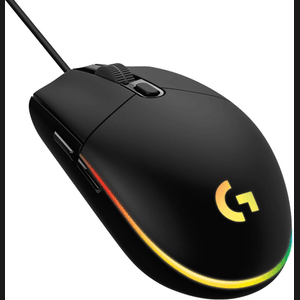
1. Logitech G102 Lightsync - Best Budget Gaming Mouse
Price: ₹1,299 | Buy on Amazon
The Logitech G102 Lightsync continues to be the undisputed king of budget gaming mice in India. For just over a thousand rupees, you get a mouse that punches way above its weight class.
Specifications:
- Sensor: Mercury Gaming-Grade Sensor
- Max DPI: 8,000
- Weight: 85g
- Connectivity: Wired USB
- Polling Rate: 1000Hz
- Buttons: 6 Programmable
Key Features:
- LIGHTSYNC RGB with 16.8 million colors
- Classic 6-button design for comfort
- Metal spring button tensioning for crisp clicks
- On-board memory for profile storage
- Logitech G HUB software support
Pros:
- Exceptional value for money
- Reliable sensor with no smoothing or acceleration
- Lightweight and comfortable for extended sessions
- Great for claw and fingertip grip users
Cons:
- Not suitable for palm grip users with large hands
- Cable could be more flexible
- No adjustable weights
Best For: Gamers on a tight budget who play FPS games like CS2, Valorant, or PUBG. Perfect for beginners entering competitive gaming.
2. Razer DeathAdder Essential - Best Budget Ergonomic Mouse
Price: ₹1,699 | Buy on Amazon
The DeathAdder line has been a favorite among gamers for over a decade, and the Essential variant brings that legendary ergonomic shape to budget-conscious gamers.
Specifications:
- Sensor: 6400 DPI Optical Sensor
- Max DPI: 6,400
- Weight: 96g
- Connectivity: Wired USB
- Polling Rate: 1000Hz
- Buttons: 5 Programmable
Key Features:
- Iconic ergonomic right-handed design
- Razer Mechanical Switches rated for 10 million clicks
- Rubber side grips for better control
- Single-zone green lighting
Pros:
- Extremely comfortable for palm grip users
- Proven ergonomic design reduces fatigue
- Durable mechanical switches
- Good tracking for the price
Cons:
- Lower DPI compared to competition
- Only green lighting (no RGB)
- Right-handed only
Best For: Palm grip users who prioritize comfort during long gaming sessions. Great for casual and competitive FPS gaming.
3. Ant Esports GM320 - Best Ultra Budget Option
Price: ₹599 | Buy on Amazon
If you are looking for a gaming mouse under ₹ 1,000, the Ant Esports GM320 delivers surprising value with features typically found in mice twice its price.
Specifications:
- Sensor: Optical Gaming Sensor
- Max DPI: 12,800
- Weight: 130g
- Connectivity: Wired USB
- Polling Rate: 1000Hz
- Buttons: 8 Programmable
Key Features:
- 8 programmable buttons including rapid-fire
- Multicolor RGB lighting
- Braided cable for durability
- Macro editing support
Pros:
- Incredible value at under ₹ 600
- High DPI range
- Multiple programmable buttons
- RGB lighting included
Cons:
- Heavier than premium options
- Build quality is average
- Software can be clunky
Best For: First-time gamers, students on a budget, or as a backup mouse. Good for MOBA and RTS games that benefit from extra buttons.
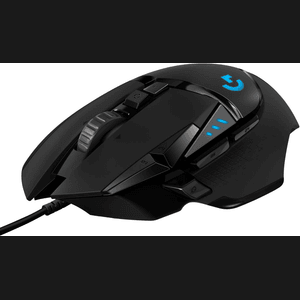
4. Logitech G304 Lightspeed - Best Budget Wireless Mouse
Price: ₹3,195 | Buy on Amazon
The G304 brings Logitech's acclaimed LIGHTSPEED wireless technology to an affordable price point. No more cable drag holding back your aim.
Specifications:
- Sensor: HERO 12K
- Max DPI: 12,000
- Weight: 99g (with battery)
- Connectivity: 2.4GHz Wireless (LIGHTSPEED)
- Polling Rate: 1000Hz
- Buttons: 6 Programmable
Key Features:
- LIGHTSPEED wireless with 1ms response time
- 250 hours battery life on single AA battery
- On-board memory for DPI settings
- Compact, portable design
Pros:
- Lag-free wireless performance
- Exceptional battery life
- Reliable HERO sensor
- Great for travel/LAN events
Cons:
- Requires AA battery (adds weight)
- No RGB lighting
- Plasticky feel compared to premium mice
Best For: Gamers who hate cable drag but cannot afford premium wireless mice. Perfect for laptop gamers and those who travel frequently.
5. HyperX Pulsefire Haste - Best Lightweight Budget Mouse

Price: ₹2,799 | Buy on Amazon
The Pulsefire Haste brings the ultralight honeycomb design trend to a competitive price point, weighing just 59 grams without sacrificing build quality.
Specifications:
- Sensor: PixArt PAW3335
- Max DPI: 16,000
- Weight: 59g
- Connectivity: Wired USB (HyperFlex Cable)
- Polling Rate: 1000Hz
- Buttons: 6 Programmable
Key Features:
- Honeycomb shell design for extreme lightness
- Virgin-grade PTFE skates for smooth gliding
- TTC Golden micro dustproof switches (60 million clicks)
- Split-button design for consistent clicks
- HyperFlex cable (minimal drag)
Pros:
- One of the lightest mice in this price range
- Excellent cable that feels almost wireless
- Premium PTFE feet included
- IP55 dust and water resistance
Cons:
- Honeycomb design may collect dust
- Not ideal for users who prefer heavier mice
- Ambidextrous shape may not suit everyone
Best For: FPS players who prefer ultralight mice for fast flick shots. Ideal for claw and fingertip grip users.
6. Razer Viper Mini - Best for Small Hands
Price: ₹2,499 | Buy on Amazon
The Viper Mini takes Razer's excellent Viper design and shrinks it for gamers with smaller hands, all while maintaining premium features.
Specifications:
- Sensor: Razer Optical (8500 DPI)
- Max DPI: 8,500
- Weight: 61g
- Connectivity: Wired USB (Speedflex Cable)
- Polling Rate: 1000Hz
- Buttons: 6 Programmable
Key Features:
- Ultralight ambidextrous design
- Razer Optical Mouse Switches (0.2ms response)
- Razer Chroma RGB underglow
- Speedflex cable for minimal drag
- 100% PTFE mouse feet
Pros:
- Perfect for small to medium hands
- Ambidextrous design suits all users
- Optical switches are extremely fast
- Beautiful RGB underglow lighting
Cons:
- May be too small for large hands
- Lower DPI than some competitors
- Limited availability (discontinued production)
Best For: Gamers with small to medium hands who prefer claw or fingertip grip. Excellent for Valorant and tactical shooters.
7. Razer Basilisk V3 - Best for MMO/Productivity
Price: ₹3,949 | Buy on Amazon
The Basilisk V3 is a feature-packed ergonomic mouse with one of the best scroll wheels in gaming and tons of customization options.
Specifications:
- Sensor: Razer Focus+ 26K
- Max DPI: 26,000
- Weight: 101g
- Connectivity: Wired USB
- Polling Rate: 1000Hz
- Buttons: 11 Programmable
Key Features:
- HyperScroll Tilt Wheel (free-spin or tactile modes)
- 11 Razer Chroma RGB lighting zones
- Multi-function trigger for secondary functions
- Razer Optical Switches Gen-2 (70 million clicks)
- On-board memory (5 profiles)
Pros:
- Best-in-class scroll wheel
- 11 programmable buttons for macros
- Stunning RGB lighting
- Extremely comfortable ergonomic shape
Cons:
- Heavier than pure FPS mice
- Right-handed only
- May have too many buttons for some users
Best For: MMO, MOBA, and RTS gamers who need extra buttons. Also excellent for productivity users who want macros.
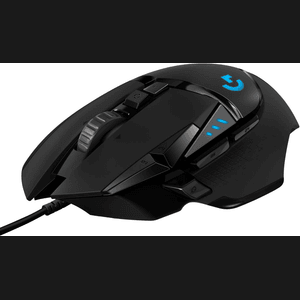
8. Logitech G502 Hero - Best All-Rounder
Price: ₹4,995 | Buy on Amazon
The G502 Hero is one of the most popular gaming mice ever made, offering an incredible balance of features, performance, and versatility.
Specifications:
- Sensor: HERO 25K
- Max DPI: 25,600
- Weight: 121g (adjustable)
- Connectivity: Wired USB
- Polling Rate: 1000Hz
- Buttons: 11 Programmable
Key Features:
- Adjustable weight system (5 x 3.6g weights)
- Dual-mode hyper-fast scroll wheel
- HERO 25K sensor with sub-micron tracking
- LIGHTSYNC RGB lighting
- On-board memory (5 profiles)
Pros:
- Highly customizable weight
- Excellent sensor performance
- Versatile for all game genres
- Premium build quality
Cons:
- Heavy compared to modern lightweight mice
- Complex shape may not suit everyone
- Cable is not the most flexible
Best For: Gamers who play multiple genres and want one mouse that does everything well. Great for those who prefer heavier mice.
9. HyperX Pulsefire Haste 2 Wireless - Best Mid-Range Wireless

Price: ₹5,999 | Buy on Amazon
The Pulsefire Haste 2 Wireless combines ultralight design with lag-free wireless performance, making it one of the best value wireless gaming mice available.
Specifications:
- Sensor: PixArt PAW3395
- Max DPI: 26,000
- Weight: 61g
- Connectivity: 2.4GHz Wireless + Bluetooth 5.0
- Polling Rate: 1000Hz (8000Hz with adapter)
- Buttons: 6 Programmable
Key Features:
- Dual wireless connectivity (2.4GHz + Bluetooth)
- Up to 100 hours battery life
- USB-C charging
- IP55 dust and water resistance
- Solid shell design (no honeycomb)
Pros:
- Excellent wireless performance at this price
- Solid shell feels more premium
- Great battery life
- IP55 rating for durability
Cons:
- No included 4K/8K polling dongle
- RGB only in logo area
- Limited side button options
Best For: Gamers upgrading from wired to wireless who want premium features without the premium price tag.
10. Logitech G Pro X Superlight 2 - Best Premium Esports Mouse
Price: ₹13,599 | Buy on Amazon
The choice of esports professionals worldwide, the G Pro X Superlight 2 represents the pinnacle of wireless gaming mouse technology.
Specifications:
- Sensor: HERO 2 Sensor
- Max DPI: 32,000
- Weight: 60g
- Connectivity: LIGHTSPEED Wireless
- Polling Rate: 4000Hz (native)
- Buttons: 5 Programmable
Key Features:
- LIGHTFORCE hybrid optical-mechanical switches
- Zero-additive PTFE feet
- 95 hours battery life
- POWERPLAY compatible
- USB-C charging
Pros:
- Used by professional esports players
- Best-in-class wireless technology
- Incredibly lightweight at 60g
- 4000Hz native polling rate
Cons:
- Premium price point
- No RGB lighting
- Only 5 buttons (minimal design)
- Ambidextrous shape may not suit everyone
Best For: Serious competitive gamers and esports aspirants who demand the absolute best performance without compromise.
Gaming Mouse Buying Guide
Understanding DPI (Dots Per Inch)
DPI measures how sensitive your mouse is. Higher DPI means the cursor moves more with less physical mouse movement.
- 400-800 DPI: Preferred by CS2/Valorant professionals for precise aiming
- 800-1600 DPI: Sweet spot for most FPS gamers
- 1600-3200 DPI: Good for MOBA and RTS games
- 3200+ DPI: Useful for high-resolution monitors and productivity
Pro Tip: Most pro gamers use lower DPI (400-800) with large mouse pads for better muscle memory and precision.
Sensor Types
Optical Sensors:
- Use LED light to track movement
- Work on most surfaces
- Generally more affordable
- Examples: PixArt 3325, 3360, 3389
Laser Sensors:
- Use laser for tracking
- Work on glass and reflective surfaces
- Can have acceleration issues
- Less popular in modern gaming mice
Best Gaming Sensors (2026):
- Logitech HERO 25K/HERO 2
- Razer Focus Pro 30K
- PixArt PAW3395
- SteelSeries TrueMove Pro
Weight Considerations
Ultralight (Under 70g):
- Best for fast flick shots and tracking
- Less fatigue during long sessions
- Preferred by FPS professionals
- Examples: G Pro X Superlight, Pulsefire Haste
Medium (70-100g):
- Good balance of speed and control
- Versatile for all game types
- Most comfortable for beginners
- Examples: G102, DeathAdder Essential
Heavy (100g+):
- More precise for slow, deliberate movements
- Better for MMO and productivity
- Can cause fatigue during long sessions
- Examples: G502 Hero, Basilisk V3
Grip Styles
Palm Grip:
- Entire palm rests on mouse
- Best for: Larger mice with ergonomic shapes
- Recommended: Razer DeathAdder, Logitech G502
Claw Grip:
- Palm touches back of mouse, fingers arched
- Best for: Medium-sized ambidextrous mice
- Recommended: Logitech G102, Razer Viper Mini
Fingertip Grip:
- Only fingertips touch mouse
- Best for: Smaller, lightweight mice
- Recommended: Razer Viper Mini, HyperX Pulsefire Haste
Wired vs Wireless
Wired Advantages:
- No battery concerns
- Consistent weight
- Generally cheaper
- No wireless interference
Wireless Advantages:
- Freedom of movement
- No cable drag
- Cleaner desk setup
- Modern wireless has no latency disadvantage
Verdict: In 2026, premium wireless mice like the G Pro X Superlight 2 have zero perceptible latency difference from wired mice. Choose based on budget and preference.
Polling Rate
Polling rate determines how often your mouse reports its position to the PC.
- 125Hz: Reports 125 times/second (8ms delay) - Not recommended for gaming
- 500Hz: Reports 500 times/second (2ms delay) - Acceptable
- 1000Hz: Reports 1000 times/second (1ms delay) - Standard for gaming
- 4000Hz/8000Hz: Reports 4000-8000 times/second - Marginal improvement, requires high-end PC
Frequently Asked Questions (FAQs)
1. Is a gaming mouse really necessary for gaming?
While you can game with any mouse, gaming mice offer advantages like better sensors for precise tracking, higher polling rates for lower latency, programmable buttons for macros, and ergonomic designs for comfort during long sessions. For competitive gaming, especially FPS titles, a good gaming mouse can noticeably improve your performance.
2. What DPI should I use for gaming?
Most professional FPS players use 400-800 DPI with low in-game sensitivity. For casual gaming or high-resolution monitors, 1000-1600 DPI works well. The key is finding a sensitivity that allows you to do a 180-degree turn with one swipe while maintaining precision. Start around 800 DPI and adjust based on comfort.
3. Are wireless gaming mice as good as wired ones in 2026?
Yes, premium wireless gaming mice from Logitech (LIGHTSPEED), Razer (HyperSpeed), and others now have latency comparable to or better than wired mice. The technology has matured significantly. However, budget wireless mice may still have noticeable latency, so stick to reputable brands if going wireless.
4. How do I choose the right mouse size for my hand?
Measure your hand from the base of your palm to the tip of your middle finger:
- Under 17cm: Small mice (Razer Viper Mini)
- 17-19cm: Medium mice (Logitech G102, Logitech G Pro X Superlight)
- Over 19cm: Large mice (Razer DeathAdder, Logitech G502)
Also consider your grip style - palm grip users need larger mice, while fingertip grip users can use smaller mice comfortably.
5. How long do gaming mice last?
Quality gaming mice typically last 3-5 years with heavy use. Key factors affecting longevity include:
- Switch durability: Look for 50+ million click ratings
- Cable quality: Braided cables last longer
- Build materials: Metal and high-quality plastics are more durable
- Feet wear: PTFE feet eventually wear down but are replaceable
Our Recommendations
Best Overall: Logitech G Pro X Superlight 2
If budget is not a concern and you want the best wireless gaming mouse available, the G Pro X Superlight 2 is unmatched in performance and build quality.
Best Value: Logitech G102 Lightsync
At around ₹ 1,299, no other mouse offers this level of performance and features. Perfect for 90% of gamers.
Best Budget Wireless: Logitech G304 Lightspeed
Lag-free wireless gaming under ₹ 3,500 with exceptional battery life. Great for laptop gamers.
Best Lightweight: HyperX Pulsefire Haste
At 59g and under ₹ 3,000, it is the most accessible ultralight mouse for aspiring competitive players.
Best Ergonomic: Razer DeathAdder Essential
The legendary DeathAdder shape at a budget price. Your wrists will thank you during marathon gaming sessions.
Best for Features: Razer Basilisk V3
11 buttons, best-in-class scroll wheel, and stunning RGB - perfect for MMO players and content creators.
Conclusion
The Indian gaming mouse market in January 2026 offers excellent options across all price points. Whether you are a budget-conscious student picking up your first gaming mouse or an esports enthusiast seeking every competitive advantage, there is a perfect mouse for you.
For most gamers, we recommend starting with the Logitech G102 Lightsync - it offers 90% of the performance at 10% of the price of premium options. As you improve and understand your preferences, you can upgrade to specialized mice that match your grip style and game requirements.
Remember, the best gaming mouse is the one that feels comfortable in your hand and suits your playstyle. Use this guide as a starting point, but do not be afraid to try different mice until you find your perfect match.
Happy gaming!
Prices and availability are subject to change. This article contains affiliate links. When you purchase through links on our site, we may earn an affiliate commission at no extra cost to you.
Related Articles:
- Best Gaming Keyboards in India 2026
- Best Gaming Headsets Under ₹ 5000
- Complete PC Gaming Setup Guide for Beginners